Leetmonkey was born on Sep 11th, 2024.

LeetMonkey Was Born on Sep 11th, 2024
Introduction
- LeetMonkey is your ultimate companion for enhancing the LeetCode experience. After much contemplation, I’ve decided to part ways with the traditional LeetCode-based interview process. Instead of ranting, I chose to create something meaningful: LeetMonkey. This innovative platform encompasses three distinct products designed to transform how you interact with coding challenges.
LeetCode’s data naturally forms a knowledge graph, interconnecting problems, tags, and the companies that have posed them. Our products include:
- Knowledge Graph Visualization: Offers a comprehensive view of interconnected problems and tags.
- Neural Search: Utilizes both sparse and dense embeddings for enhanced natural language search capabilities.
- LeetMonkey Companion:
- Solve random LeetCode problems using a browser-based WASM Python IDE.
- Leverage the quantized LeetMonkey fine-tuned model to generate complete solutions.
- Hosted on a free Hugging Face Space with 16GB RAM and 2 vCPUs, the model can solve a problem in approximately six minutes.
- Request explanations for generated solutions.
Let’s delve deeper into each of these groundbreaking products that form LeetMonkey, launched on September 11, 2024.
Breaking Up with LeetCode
- Ranting: After interviewing for over a decade across various stages of tech companies—from seed stage startups to large publicly traded corporations—I’ve learned a few lessons. Please bear with me as I share my experiences.
If there’s one lesson I’d pass on to the next generation, it’s the importance of personal branding. Whether through contributing to a prominent open-source project, building a trendsetting product, or any other means, establishing your brand is crucial. In Silicon Valley, individual contributor roles often overlook experience.
A Story of Interview Practices
Imagine a hiring manager at Apple reaching out to a friend at another firm to discuss interview processes. The friend describes a structure involving three LeetCode rounds. Inspired, the Apple manager adopts the same approach. Later, this manager joins a Series A startup as a VP of Engineering, bringing Apple’s interview culture with them, regardless of the startup’s goals.
Why Apple? Despite its legacy and success, my experiences with their recruiters and hiring managers have been disappointing. They lack a unified application tracking system, and despite multiple interviews, they seem unaware of my history. Recently, after passing an initial coding test, I faced three additional LeetCode rounds. When I asked why, the hiring manager simply stated it was policy.
Interviewer Challenges
Few large corporations train their interviewers effectively. Most make decisions early in the interview process. In one instance, an interviewer interrupted me to insist on using a Map instead of a Set, disregarding the natural coding flow.
Expectations in interviews have evolved. From whiteboard coding to shared editors with auto-complete, and now timed challenges demanding quick solutions to complex problems. Despite claims of assessing problem-solving and communication skills, untrained interviewers and human bias remain significant hurdles.
Recently, I encountered an interview combining timed challenges with disabled code execution, requiring manual debugging. This setup is designed for failure.
I’m breaking up with LeetCode-based interviews and roles that demand multiple rounds of coding challenges. In an era of generative code, solving basic algorithm problems feels outdated. Despite mastering numerous patterns, these interviews remain a black box, often set up for failure.
Building a Knowledge Graph from LeetCode Problems
LeetCode problems are inherently suitable for creating a knowledge graph. We can identify multiple node and edge types, forming a heterogeneous graph. Here’s a breakdown of the current dataset:
Node Types and Counts:
- Problem: 3,269
- Tag: 71
- Company: 422
Edge Types and Counts:
- (‘problem’, ‘has_tag’, ‘tag’): 9,612
- (‘problem’, ‘asked_by’, ‘company’): 10,225
- (‘problem’, ‘related_to’, ‘problem’): 4,745
Before diving into PyG-based heterogeneous graphs and embeddings, let’s explore a snapshot of these connections:
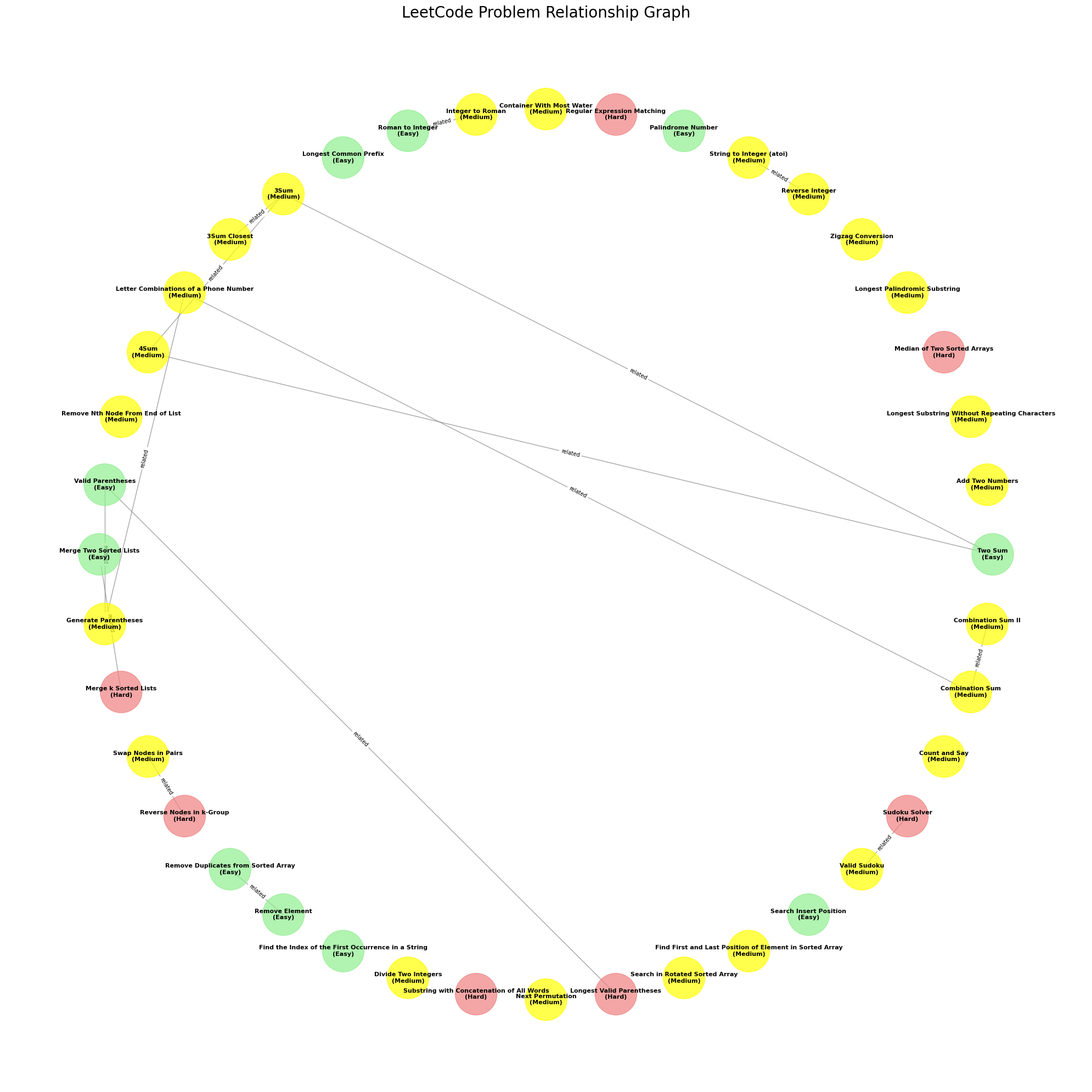
As seen in this subcomponent, the dataset’s interconnected nature becomes evident. The first step involves constructing the knowledge graph in Graphology format for LeetMonkey visualization.
LeetMonkey Visualization
Explore the interactive knowledge graph visualization here: LeetMonkey Visualization. Each node’s weight is determined by the number of companies that have used it in interviews. Use filters to search for problems and navigate the graph. Drag and interact with the visualization to gain insights.
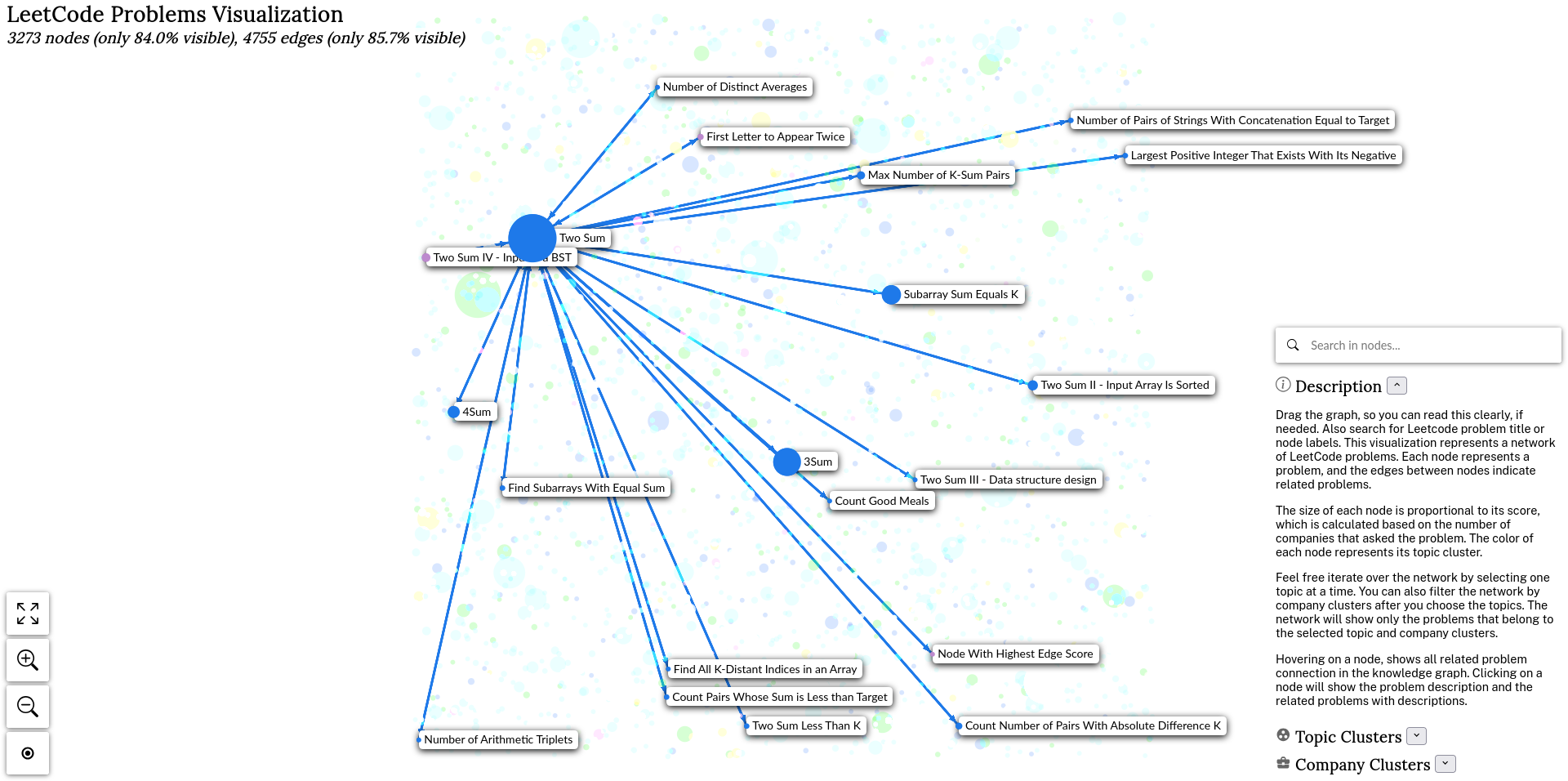
LeetMonkey Dataset
Introducing the LeetMonkey dataset, which will be utilized in future sections. Access it on Hugging Face: LeetMonkey Python Dataset.
Stay tuned as we delve into PyG-based knowledge graph generation and embeddings.
PyG-Based Hetero Graph Embeddings
In this section, we’ll explore how we leverage PyTorch Geometric (PyG) to create heterogeneous graph embeddings for our LeetCode knowledge graph. This approach allows us to capture the complex relationships between problems, tags, and companies in a low-dimensional space.
Heterogeneous Graph Neural Network Architecture
We implement a custom KnowledgeGraphGNN class that utilizes PyG’s HeteroConv layer to handle different types of edges in our graph. The architecture includes:
Multiple
HeteroConvlayers with different convolutions for each edge type:SAGEConvfor problem-tag and problem-company relationshipsGATConvfor problem-problem relationships
Linear layers for each node type to project embeddings to the desired output dimension
The forward pass of this model processes the heterogeneous graph data and produces embeddings for each node type.
Training Process
The LeetCodeEmbeddings class encapsulates the training and embedding generation process:
- We initialize the GNN model with specified hidden channels and output dimensions.
- The training loop runs for a set number of epochs, using Adam optimizer and MSE loss.
- During training, we move data to GPU if available for faster computation.
- The loss is calculated as the sum of MSE losses for each node type.
Embedding Generation
After training, we generate embeddings using the trained model:
- Set the model to evaluation mode.
- Forward pass the graph data through the model.
- Extract embeddings for problems, tags, and companies.
- Convert the embeddings to NumPy arrays for further processing or storage.
Key PyG Components
HeteroConv: Allows us to define different convolution operations for different edge types in our heterogeneous graph.SAGEConvandGATConv: Graph convolution layers that aggregate information from neighboring nodes.HeteroData: PyG’s data structure for heterogeneous graphs, which we use to store our LeetCode knowledge graph.
Embedding Utilization
The generated embeddings capture the structural and semantic information of our LeetCode knowledge graph. These embeddings can be used for various downstream tasks such as problem recommendation, similarity search, or visualization of the problem space.
By leveraging PyG’s heterogeneous graph capabilities, we create a rich representation of the LeetCode problem ecosystem, capturing the intricate relationships between problems, tags, and companies.
Sparse and Dense Embedding Generation
SPLADE: Sparse Lexical and Expansion Model
SPLADE represents a significant advancement in learnable sparse embedding models for information retrieval [1]. Key features include:
- Utilizes pretrained language models like BERT with a Masked Language Modeling (MLM) head
- Enables term expansion, including relevant terms beyond those in the original text
- Learns term expansions based on sentence context, minimizing vocabulary mismatch problems
- Aggregates probability distributions from the MLM head to create a sparse vector representation
The SPLADE process:
- Tokenizes input text
- Passes tokens through BERT layers
- MLM head produces probability distributions for each token
- Aggregates distributions into a single “importance estimation” sparse vector
This approach allows SPLADE to identify and include relevant terms not present in the original input, significantly improving retrieval performance.
Dense Embeddings with Sentence Transformers
For dense embedding generation, we utilize Sentence Transformers:
- Based on models like BERT, RoBERTa, or DistilBERT
- Produces fixed-size dense vector representations of sentences or paragraphs
- Trained on large datasets to capture semantic meaning
- Enables semantic similarity search and clustering of sentences
Storage in Pinecone for Hybrid Search
Both sparse (SPLADE) and dense (Sentence Transformer) embeddings are stored in Pinecone:
- Pinecone supports hybrid search combining both embedding types
- Allows for efficient retrieval using both exact term matching and semantic similarity
- Enables flexible querying strategies to balance precision and recall
Splade and Pinecone Modifications
Overcoming SPLADE Limitations
Handling Increased Non-Zero Values:
- SPLADE vectors typically have more non-zero values than traditional sparse vectors.
- Pinecone’s retrieval engine is optimized to handle this increased density efficiently.
Adapting to Non-Traditional Distribution:
- SPLADE vectors deviate from the expected distribution in traditional sparse retrieval systems.
- Pinecone’s system is designed to be agnostic to data distribution, ensuring optimal performance.
Native Support for SPLADE Vectors:
- Many systems require pre- and post-processing steps for SPLADE vectors.
- Pinecone natively supports real-valued sparse vectors, eliminating the need for additional processing.
Implementation Highlights
- Vector Format: SPLADE vectors are stored as compact dictionaries with non-zero positions and weights.
- Hybrid Search Capability: Pinecone allows combining SPLADE sparse vectors with dense embeddings for enhanced retrieval.
Code Snippet: Batch Processing for Pinecone
for i in tqdm(range(0, len(questions_df), batch_size)):
    combined_texts = [
        f"{row['content']} {row['topicTags']} {row['title']}"
        for _, row in questions_df.iloc[i:i + batch_size].iterrows()
    ]
    dense_embeddings = dense_model.encode(combined_texts).tolist()
    sparse_batch = splade.encode_documents(combined_texts)
    vectors = [
        {
            'id': str(row[1]['QID']),
            'values': dense_embeddings[j],
            'sparse_values': sparse_batch[j],
            'metadata': {
                'title': row[1]['title'],
                'content': row[1]['content'],
                # ... other metadata ...
            }
        }
        for j, row in enumerate(questions_df.iloc[i:i + batch_size].iterrows())
    ]
    index.upsert(vectors=vectors, namespace='leetcode-problems')
This implementation showcases how Pinecone efficiently handles both dense and sparse embeddings in a single upsert operation, leveraging SPLADE’s capabilities while maintaining high retrieval performance. This summary highlights Pinecone’s specific adaptations for SPLADE, focusing on how it addresses the challenges of implementing SPLADE in a vector database context, and includes a relevant code snippet demonstrating the batch processing approach for inserting both dense and sparse embeddings into Pinecone.
Hybrid Search Overview
Hybrid search, also known as neural search, combines the strengths of traditional keyword-based search and modern semantic search techniques to provide more accurate and relevant results.
Key Components
Dense Vectors:
- Represent semantic meaning of text
- Enable similarity search based on context and meaning
- Generated by neural network models like BERT or SBERT
Sparse Vectors:
- Represent keyword importance in documents
- Enable traditional keyword matching
- Often based on algorithms like TF-IDF or BM25
How Hybrid Search Works
Vector Creation:
- Dense vectors are created using neural embedding models
- Sparse vectors are generated from keyword analysis
Indexing:
- Both dense and sparse vectors are stored together in a vector database
Querying:
- User queries are converted to both dense and sparse representations
- The search engine combines results from both vector types
Result Ranking:
- Results are ranked based on a combination of semantic similarity and keyword relevance
Advantages of Hybrid Search
- Improves relevance for out-of-domain queries
- Balances semantic understanding with exact keyword matching
- Provides more comprehensive search results
Implementation in Pinecone
Pinecone supports hybrid search through sparse-dense vectors:
- Vectors contain both dense and sparse components
- Indexes use the dot product metric for compatibility
- Querying utilizes both vector types simultaneously
Considerations
- Serverless indexes may have different query execution strategies
- Sparse vector retrieval can incur additional costs
- There are limitations on sparse vector dimensions and non-zero values
Hybrid search represents a significant advancement in information retrieval, combining the best aspects of traditional and modern search techniques to deliver more accurate and contextually relevant results.
LeetMonkey Hybrid Search
LeetMonkey’s second product is a hybrid search system that enhances LeetCode’s search capabilities by combining traditional keyword search with advanced semantic search. This neural search feature is accessible at LeetMonkey Hybrid Search.
Key Features:
- Partial Problem Statement Search: Users can search using incomplete problem descriptions and find relevant patterns.
- Company-Specific Queries: The system can recommend problems based on specific companies, e.g., “upcoming interview with Google”.
- Topic-Based Recommendations: Users can request problems focused on particular topics like Dynamic Programming.
Example Search Query:
query = "Given a string s containing just the characters '(', ')', '{', '}', '[' and ']', determine if the in"
results = hybrid_search(query)

"Find First Palindromic String in the Array"

    Tags: array, two-pointers, string
    Companies: Amazon

"Keyboard Row"

    Tags: array, hash-table, string
    Companies: Google, Amazon, MathWorks

"Evaluate the Bracket Pairs of a String"

    Tags: array, hash-table, string
    Companies: Google
Benefits:
- Discovers problems with similar patterns, even if the exact keywords don’t match.
- Provides company-specific problem recommendations for interview preparation.
- Offers a more intuitive and flexible search experience compared to traditional LeetCode search.
A screencast demo of the hybrid search functionality is available, showcasing its capabilities in real-time.
LeetMonkey Knowledge Graph Visualization
Showcasing LeetMonkey Products
LeetMonkey offers three innovative products to enhance your LeetCode experience:
LeetMonkey Neural Search: Hybrid search combining sparse and dense embeddings for improved problem discovery.
LeetMonkey Visualization: Interactive knowledge graph visualization of LeetCode problems and their relationships.
LeetMonkey Companion: WASM-based code editor with LeetMonkey code model completion for practicing LeetCode problems.
Disclaimers:
- LeetMonkey Companion runs on free Render infrastructure with 512MB RAM and 0.1 CPU core. Due to Render’s hibernate mode for free tier, initial loading may take a few minutes.
- LeetMonkey Neural Search and model inference API use a free Hugging Face space with 16GB RAM CPU and 2 vCPUs.
- LeetMonkey Visualization is hosted on free Vercel infrastructure.
Please note that due to the use of free-tier services, performance may vary and initial loading times might be longer than usual.
LeetMonkey Code Language Model
Base Model: DeepSeek
DeepSeek Coder is an advanced series of code language models developed by DeepSeek AI. The base model we’re using for LeetMonkey is deepseek-ai/deepseek-coder-6.7b-instruct, which is part of the DeepSeek Coder family [2].
Key features of DeepSeek Coder include:
- Trained from scratch on a massive dataset of 2T tokens
- Composition of 87% code and 13% natural language (English and Chinese)
- Available in various sizes ranging from 1B to 33B parameters
- Supports project-level code completion and infilling
- State-of-the-art performance among open-source code models on multiple programming languages and benchmarks
For LeetMonkey Code Language Model, we’re using this base model to create a fine-tuned, modern Python-only version. Our model will be:
- Knowledge distilled
- Quantized for efficient deployment
- Specifically trained on the LeetMonkey dataset
- Optimized for code generation, completion, and explanation tasks
Further details about the model architecture, training process, and performance metrics will be discussed in upcoming sections.
LeetMonkey Dataset
For our fine-tuning process, we prepared a custom dataset following the format used in the Evol-Instruct-Code-80k-v1 dataset. This approach ensures compatibility with existing code generation models and allows for effective fine-tuning on LeetCode-style problems.
Dataset Format
Our dataset follows the structure of the Evol-Instruct-Code-80k-v1 dataset, which includes:
instruction: The problem statement or coding taskoutput: The expected solution or code snippet
This format is particularly suited for instruction-following models and code generation tasks.
LeetMonkey Python Dataset
We’ve created a specialized dataset focusing on Python solutions for LeetCode problems. This dataset is crucial for fine-tuning our model to generate high-quality Python code for algorithmic challenges.
Dataset Link: LeetMonkey Python Dataset
Key features of our dataset:
- Focused on Python implementations
- Covers a wide range of LeetCode problem types
- Includes both problem statements and corresponding Python solutions
- Designed to enhance the model’s ability to generate efficient and correct Python code for algorithmic problems
By using this custom dataset, we aim to create a model that is specifically tailored to assist with LeetCode-style coding challenges in Python, providing users with accurate and efficient code solutions.
Fine-Tuning with SQUAD, PEFT, and LORA
Our fine-tuning process for LeetMonkey incorporates several advanced techniques to efficiently adapt the DeepSeek Coder model to our specific task. We utilize Parameter-Efficient Fine-Tuning (PEFT) with Low-Rank Adaptation (LoRA), alongside Scheduled Quantization-Aware Knowledge Distillation (SQUAD).
Model and Dataset
- Base Model:
deepseek-ai/deepseek-coder-6.7b-instruct - Dataset: Custom LeetCode problem dataset (
sugiv/leetmonkey_python_dataset)
PEFT Implementation
We use LoRA as our PEFT method, configured as follows:
lora_config = LoraConfig(
    r=16,
    lora_alpha=32,
    target_modules=["q_proj", "v_proj"],
    lora_dropout=0.05,
    bias="none",
    task_type=TaskType.CAUSAL_LM
)Knowledge Distillation and SQUAD
We implement a custom ScheduledSQAKDLoss that combines cross-entropy, knowledge distillation, and quantization losses:
    def __init__(self, initial_alpha=0.5, initial_beta=0.1, total_steps=1000, temperature=2.0):
        super().__init__()
        self.initial_alpha = initial_alpha
        self.initial_beta = initial_beta
        self.total_steps = total_steps
        self.current_step = 0
        self.temperature = temperature

    def forward(self, student_logits, teacher_logits, labels, quantized_student_logits):
        # Loss calculation logic here
        # ...
This loss function dynamically adjusts the balance between:
- Cross-entropy loss (fitting training data)
- Knowledge distillation loss (mimicking the teacher model)
- Quantization loss (preparing for potential model quantization)
Training Process
Our CustomTrainer class implements the SQUAD approach:
class CustomTrainer(Trainer):
    def __init__(self, *args, teacher_model=None, total_steps=None, **kwargs):
        super().__init__(*args, **kwargs)
        self.teacher_model = teacher_model
        self.sqakd_loss = ScheduledSQAKDLoss(total_steps=total_steps)

    def compute_loss(self, model, inputs, return_outputs=False):
        # Custom loss computation logic here
        # ...
By combining PEFT, LoRA, and SQUAD, we efficiently adapt the large DeepSeek Coder model to our LeetCode problem-solving task while preparing it for potential quantization and leveraging the knowledge of the original model through distillation.
PEFT Implementation: LoRA
PEFT method: LoRA
LoRA configuration:
- Rank (r): 16
- LoRA alpha: 32
- Target modules: “q_proj” and “v_proj” (query and value projections in attention layers)
Knowledge Distillation:
- Teacher: Original model
- Student: LoRA-adapted model
Custom loss function (ScheduledSQAKDLoss):
- Cross-entropy loss
- Knowledge distillation loss (KL divergence)
- Quantization loss (MSE)
Training Process:
CustomTrainerclass overridescompute_lossmethod.- Calculates outputs from both teacher and student.
- Balances between matching teacher’s knowledge, fitting training data, and preparing for quantization.
SQUAD (Scheduled Quantization-Aware Knowledge Distillation):
- Dynamically adjusts balance between cross-entropy, knowledge distillation, and quantization losses.
- Alpha parameter controls balance between cross-entropy and knowledge distillation.
- Beta parameter controls influence of quantization loss.
Leveraging PEFT:
- LoRA allows for fine-tuning with minimal additional parameters.
- Only LoRA parameters are trained.
- Reduces memory requirements and training time.
Training Configuration:
- Mixed precision (fp16)
- Gradient checkpointing
- Cosine learning rate scheduler
- Gradient accumulation
ScheduledSQAKDLoss Function
Initialization:
- Takes parameters:
initial_alpha,initial_beta,total_steps,temperature alphacontrols balance between cross-entropy and knowledge distillation.betacontrols influence of quantization loss.- Tracks current training step.
Forward Pass:
- Calculates three loss components:
- Cross-entropy (CE) loss
- Knowledge Distillation (KD) loss
- Quantization loss
Dynamic Weighting:
- As training progresses:
- Weight of CE loss increases (1 -
current_alpha) - Weight of KD loss decreases (
current_alpha) - Weight of quantization loss increases (
current_beta)
- Weight of CE loss increases (1 -
Loss Calculation:
- KD loss: KL divergence between softmax outputs of student and teacher, scaled by temperature.
- CE loss: Standard cross-entropy between student predictions and true labels.
- Quantization loss: MSE between student logits and their quantized version.
Total Loss:
- Combines three loss components using dynamically adjusted weights.
Step Update:
- Increments the current step after each forward pass.
Purpose:
- Gradually shifts focus from mimicking teacher (KD loss) to fitting training data (CE loss) while preparing for quantization (quantization loss).
- Scheduling helps balance these objectives throughout training.
Static Quantization and GGUF Model Conversion
llama.cpp and Quantization
llama.cpp is a popular C/C++ implementation of the Llama model, known for its efficiency and support for various quantization methods. Quantization reduces model size and improves inference speed while maintaining reasonable performance.
The quantization process in llama.cpp involves:
- Converting the model to GGUF (GPT-Generated Unified Format) format
- Applying different quantization methods to the GGUF file
Quantization Methods Used
We applied several quantization methods to our LeetMonkey model:
- q8_0: 8-bit quantization, balancing model size and performance
- Q6_K: 6-bit quantization with super-blocking, further reducing size
- F16: 16-bit floating-point, preserving more precision
- COPY: Exact copy, used as a baseline for comparison
LeetMonkey Model Links
Fine-tuned Model: LeetMonkey PEFT Model
GGUF Format: LeetMonkey PEFT GGUF Model
These links provide access to both the original fine-tuned model and its GGUF versions, enabling easy integration with llama.cpp and other compatible inference frameworks.
Streaming Token Generation Demo
- Refer above.
LeetMonkey Companion
Product Overview
LeetMonkey Companion is an innovative web-based Python practice tool designed to revolutionize your LeetCode preparation experience. This cutting-edge platform combines the power of a WASM-based Python editor with an AI-driven code generation system, providing a unique environment for honing your coding skills.
Key Features
Pyodide WASM-based Python Editor
- Real-time Execution: Write and run Python code directly in your browser without any setup.
- Syntax Highlighting: Enjoy a professional coding experience with full syntax coloring.
- Auto-completion: Benefit from intelligent code suggestions to speed up your coding process.
LeetMonkey Dataset Integration
- Random Problem Generation: Instantly access a vast array of LeetCode-style problems at the click of a button.
- Curated Problem Selection: Choose from carefully categorized problems based on difficulty, topic, or company preferences.
- Problem Description Display: View detailed problem statements, constraints, and examples in a clear, easy-to-read format.
AI-Powered Code Generation
- LeetMonkey PEFT Model: Utilizes the
leetmonkey_peft_super_block_q6.ggufquantized model for efficient code generation. - Code Stub Completion: Watch as the AI model completes the initial code stub, providing a potential solution approach.
- Solution Explanation: Request detailed explanations of the generated code to enhance your understanding.
Performance Comparison
- Coding Speed Metrics: Track your coding speed and compare it with the AI model’s solution generation time.
- Progress Tracking: Monitor your improvement over time with detailed performance analytics.
- Realistic Interview Simulation: Experience the pressure of solving problems within interview-like time constraints.
Technical Specifications
- Model: LeetMonkey PEFT Super Block Q6 (GGUF format)
- Inference Hardware: CPU-only setup with 16GB RAM and 2 vCPUs
- Hosting: Quart app on Render’s free tier (512MB RAM, 1 CPU core)
- Response Time: Up to 6 minutes for LeetCode Hard problems
Usage Guidelines
- Problem Selection: Choose a random problem or select one based on your preference.
- Coding Environment: Utilize the Pyodide-powered editor on the right side to write your solution.
- AI Assistance: While you code, the LeetMonkey model will work on completing the code stub on the left.
- Time Management: Aim to solve Hard problems within 20 minutes to meet typical interview expectations.
- Learning from AI: Once the model generates a solution, compare it with yours and request explanations for deeper understanding.
Performance Insights
- Human vs. AI: While the model may take up to 6 minutes for Hard problems, interviewers often expect candidates to solve them in 20 minutes.
- Improvement Opportunities: Use the time difference to refine your problem-solving strategies and coding efficiency.
Future Enhancements
- Integration with more advanced hardware for faster AI response times
- Expanded problem database with regular updates from latest LeetCode additions
- Personalized learning paths based on your performance and areas for improvement
Experience the future of coding practice with LeetMonkey Companion – your AI-powered partner in mastering LeetCode challenges!
Summary of LeetMonkey Products
Visualization of Knowledge Graph
- Interactive visualization tool for LeetCode problems and their relationships
- Hosted on Vercel’s free infrastructure at https://leetmonkey-visualization.vercel.app/
- Allows users to explore connections between problems, tags, and companies
- Features:
- Node weighting based on the number of companies using each problem
- Filtering options for customized views
- Search functionality to locate specific problems
- Drag-and-drop interface for intuitive exploration
- Helps users understand the interconnected nature of coding challenges
- Useful for strategic learning and interview preparation
Natural Language based Neural Search on Sparse and Dense Embeddings
- Advanced search system combining SPLADE and dense embeddings
- Hosted on Hugging Face Spaces: https://huggingface.co/spaces/sugiv/leetmonkey-hybridsearch-languagemodel
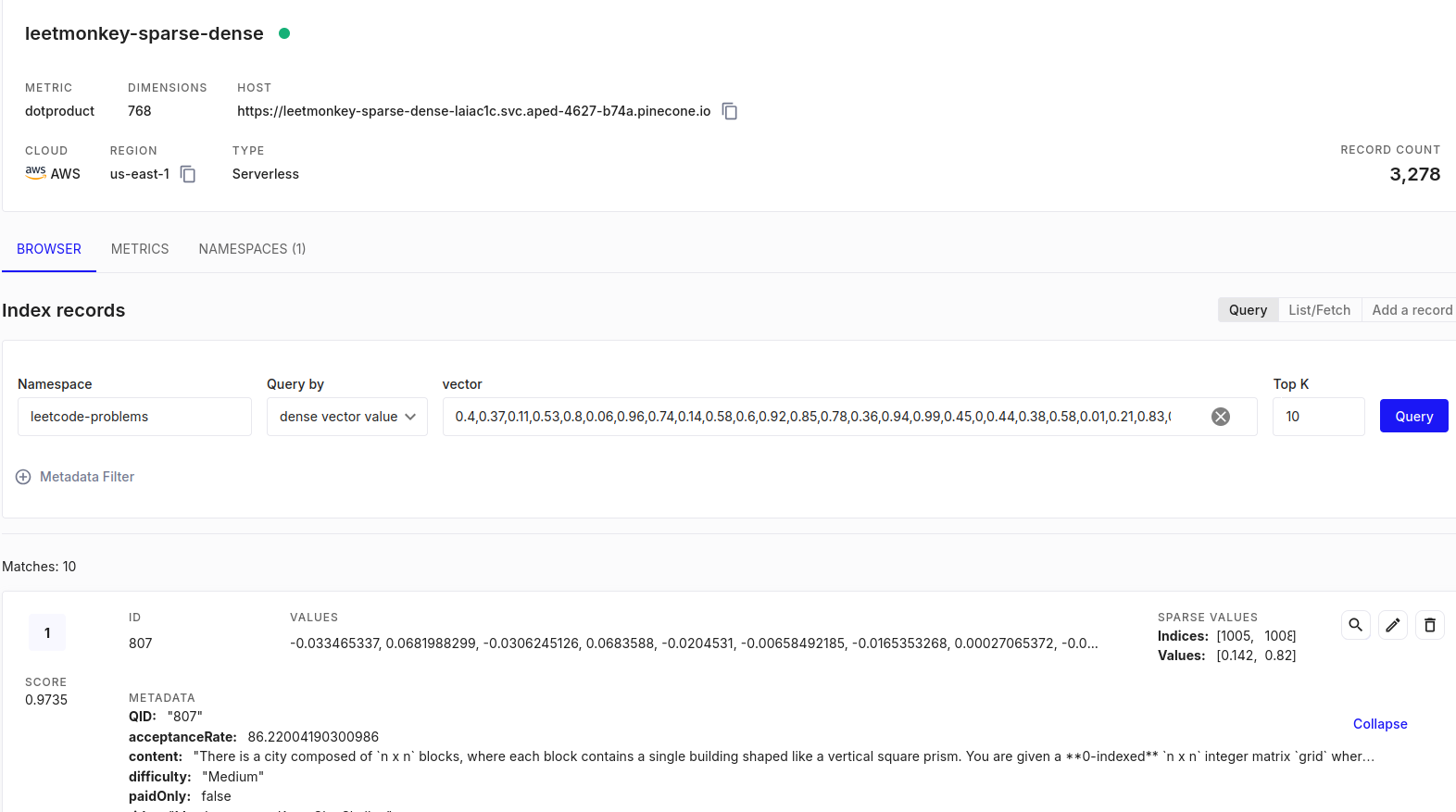
- Utilizes a Pinecone vector database with 3,278 records
- Features:
- Hybrid search combining semantic and keyword-based approaches
- Ability to find relevant problems from partial descriptions
- Company-specific and topic-based problem recommendations
- 768-dimensional dense embeddings with sparse vector components
- Enables efficient problem discovery based on descriptions, topics, or concepts
- Improves search relevance for queries without exact keyword matches
- Runs on free-tier infrastructure (16GB RAM, 2 vCPUs) demonstrating cost-effective deployment
LeetMonkey Companion
- Web-based Python practice tool with AI-powered code generation
- Hosted on Render’s free tier at https://leetmonkey-again.onrender.com
- Integrates a Pyodide WASM-based Python editor with the LeetMonkey AI model
- Features:
- Real-time Python code execution in the browser
- Random problem generation from the LeetMonkey dataset
- AI-powered code stub completion using the
leetmonkey_peft_super_block_q6.ggufmodel - Solution explanations provided by the AI model
- Performance comparison between user and AI coding speeds
- Utilizes a quantized version of the fine-tuned DeepSeek Coder model
- Runs on limited resources (512MB RAM, 0.1 CPU core) showcasing efficient model deployment
- Simulates realistic interview conditions with AI-generated solutions taking up to 6 minutes for hard problems
These three products form a comprehensive ecosystem for LeetCode preparation, offering visual learning, intelligent problem discovery, and hands-on coding practice with AI assistance. Together, they address various aspects of coding interview preparation, from understanding problem relationships to practicing efficient problem-solving techniques.
References
[1] https://www.pinecone.io/learn/splade/
[2] https://github.com/deepseek-ai/DeepSeek-Coder/tree/b7ba565956fe61153064f288862daf1896de5393