Meritclaw: A Multi-Model Pipeline That Fills Job Applications

Meritclaw
A multi-model pipeline that finds the jobs, rebuilds a LaTeX resume for each one under a structural gate that cannot be bypassed, and completes any employer’s application form — reading each page through the browser’s accessibility tree, and through a vision model when the tree lies.
Table of Contents
- The pain
- What it does
- What is actually running
- The two halves, drawn out
- The program is a markdown file
- How it works without knowing any site
- Where the jobs come from
- Three models, three genuinely different jobs
- The resume rebuilds itself, and cannot lie
- What it costs
- Making it trustworthy enough to leave running
- What a month of operating taught me
- What surprised me
- A note on blast radius
The pain
You upload a resume. The ATS flattens it into a text blob, reads the three-column info bar as one run-on line, drops the skills tables because they were tables — and then asks you to type twelve of the same fields in by hand.
Then it gets worse.
Workday makes you create an account per employer. Five Workday companies, five signups, five passwords, none of which know each other. The application itself is five to eight steps, and it wants your work history typed one role at a time, with dates entered through segmented three-part controls, and your education repeated from the PDF you uploaded four screens ago.
Government applications are longer still. A NEOGOV application is eight tabs — Info, Work, Education, Additional, References, Attachments, Questions, Review — ending in a Certify step that stays greyed out until every other tab is complete. One of them carried thirty-four supplemental questions. CalCareers wants a full STD 678 and a written statement of qualifications on top.
Forty minutes an application when nothing goes wrong. A serious search is a hundred and fifty of them. That is a hundred hours of retyping facts that are already in the PDF sitting on their server — and by question twenty-nine, nobody’s answers are any good.
Every one of those forty minutes is spent on a machine’s convenience, not a human’s. That is what Meritclaw was built to take back.
What it does
Finds the postings. Rebuilds the resume for each one, from LaTeX, without touching its structure. Writes the cover letter. Fills the employer’s form — any employer’s form — uploads the documents, submits, and confirms it went through. Then asks a human only when something genuinely cannot be automated: a CAPTCHA, a verification code, a timed test.
57 applications 12 ATS platforms 43 employers $0.53 per application 38 Python modules 0 lines of site-specific code
Greenhouse, Ashby and Lever at the easy end. Workday in the middle. Eight-tab government applications at the other. There is no list of supported employers — nothing in the system knows which platform it is looking at, because it reads the page the way a person does rather than matching selectors someone wrote in advance.
The component that decides what to type is a markdown file. I deleted 653 lines of Python to get there — and then wrote 8,700 more to make the result safe to leave running unattended.
What is actually running
Three DeepSeek models, chosen per task rather than per request:
- flash screens two thousand job titles a week, fifty to a call
- v4-pro reads an unfamiliar application form and decides what each field wants — no schema, because every employer invents their own
- vision answers “what does this look like to a person” when the accessibility tree is not enough: a save that silently failed, a segmented date control that ate the digits, a page rendering an error where a job should be
Two schedulers on top of them, sharing one browser through a lock:
- the scout, every two hours, on a thirteen-step rotation — eight job sources, relevance screening, a sweep that rules out dead postings, a corrector for adverts masquerading as applications, and a builder that has the next job’s documents ready before anything needs them
- the applier, every twenty minutes, picking the cheapest job that can actually finish, rebuilding the resume from LaTeX, proving the layout did not drift, filling the form, uploading, submitting, verifying
And underneath, the part that took the longest and matters most: a layout gate
that renames any drifted PDF .pdf.rejected, a staging fence so only
gate-passed files can ever be uploaded, a spend cap split into lanes so
applications cannot starve discovery, canonical job identity so nothing is
applied to twice, per-run outcome accounting, and 277 automated checks.
57 applications 12 ATS platforms 43 employers $0.53 per application 38 Python modules 0 lines of site-specific code
There is no list of supported employers. Greenhouse, Ashby and Lever at the easy end; Workday, which demands a separate account per employer; eight-tab government applications with thirty-four supplemental questions at the other. Nothing in the system knows which it is looking at.
The component that decides what to type is a markdown file. I deleted 653 lines of Python to get there — and then wrote 8,700 more to make the result safe to leave running overnight.
The two halves, drawn out
THE SCOUT every 2 hours ──────────────────────────────────────────────────────────────── 8 sources ──▶ screen titles ──▶ queue ──▶ I approve in a dashboard CalCareers 50 at a time 545 jobs 291 approved NEOGOV on the cheap CalOpps model JobAps SF.gov │ federal ▼ LinkedIn ──▶ decode the redirect ──▶ employer’s own board programmes
THE APPLIER every 20 minutes, holds the browser lock ──────────────────────────────────────────────────────────────── pick cheapest job ──▶ rebuild resume ──▶ layout gate ──▶ staged from main.tex pass/reject │ ▼ read the page ──▶ fill every field ──▶ upload ──▶ submit ──▶ verify accessibility reasoning model gate-passed on screen tree files only │ ▼ something only a human can do? ──▶ WhatsApp, and the run ends
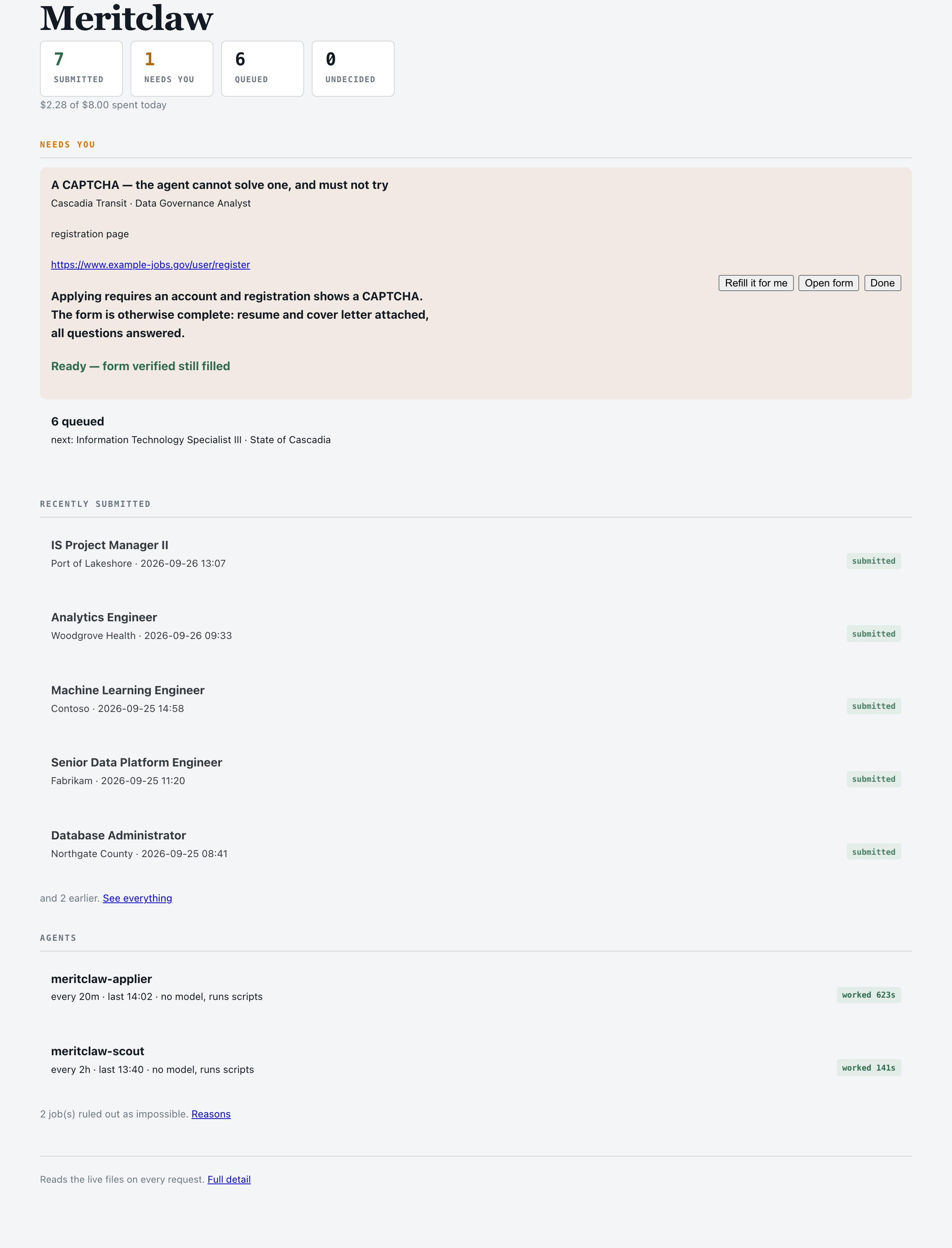
The dashboard, running on seeded demo data. Loopback only — it reads files on the same machine and nothing leaves it.
Twelve platforms so far: NEOGOV, Workday, Greenhouse, Lever, iCIMS, Ashby, SmartRecruiters, CalCareers, CalOpps, SF.gov, JobAps and Jobvite. Government and private sector, three-field forms and eight-step wizards.
No Playwright selectors for NEOGOV. No CSS paths for Workday. No per-employer scripts of any kind. Adding an employer costs nothing, and every platform I had never seen before worked the first time it was tried.
The program is a markdown file
This is the part I did not expect.
Meritclaw is not a Python program that calls an LLM. The thing that decides what to do is a 972-line markdown file. It is a skill, the agent runtime loads it, and it reads like instructions to a careful colleague rather than like code:
### Filling a form: you drive the browser directly

There is no form filling script, and you should not ask for one. You have a
browser. Use it the way a person does: look at the page, then act on what
you saw.

The label is the question. Read it and decide what belongs there from
profile.yaml. No pattern matching. You are reading, the way he would.
Underneath it there is Python, but almost none of it makes decisions. The Python builds PDFs, enforces limits and stores facts. Every judgment lives in the markdown.
I did not start here. The first form filler was four hundred lines of substring matching:
RESUME_HINTS = ["resume", "cv", "curriculum", "upload your resume"]
COVER_HINTS  = ["cover letter", "coverletter", "letter of interest"]
POSITION_HINTS = ["select position", "position to apply", "requisition"]
Every new employer broke it and earned another pattern. Then I hit a file input
named fileinputcomp-l7qrljo2 whose visible label read “Upload Cover Letter
(PDF ONLY!)“. No hint list catches that; a model reading the label gets it
instantly.
I deleted all 653 lines. A paragraph of instructions replaced them, and worked immediately on platforms I had written nothing for.
What stayed code, and why
Deleting rules is only safe if you are precise about which ones must survive. Three kinds did:
| Must never be a judgment call | Enforced how |
|---|---|
| My resume’s structure, style and page count | A gate that renames the PDF .pdf.rejected on any deviation |
| What can be uploaded | The upload directory only ever contains gate passed files |
| What can be submitted, and how much can be spent | An approvals file and a hard daily cap, both checked in Python |
Everything else belongs to the model.
How it works without knowing any site
The agent reads the accessibility tree — the structured description every browser already builds for screen readers — and acts on what it finds:
textbox “First Name ” [ref=e194] combobox “Highest year completed ” [ref=e427] button “Submit Application” [ref=e882]
That is the whole interface. The model sees labels and positions, decides what
each field wants, and acts by reference: type into e194, select in e427,
click e882.
This is why it generalises. The accessibility tree is a property of the web, not of a site anyone wrote code for — so there is no list of supported employers, and nothing to add when a new one appears.
Greenhouse, Lever and Ashby are the easy end: a single page, a resume, a handful of questions, done in one pass.
Workday is the hard end, and it is the one everybody complains about. Every employer runs its own tenant with its own account, so applying to five Workday companies means five separate signups. The application itself is five or eight steps — My Information, My Experience, Application Questions, Voluntary Disclosures, Review — with work history typed in one role at a time, dates entered through segmented three-part controls, and education repeated from the PDF you already uploaded. Meritclaw creates the account, signs in, fills every step and comes out the other side — six Workday applications so far across six separate tenants, with six accounts it generated and stored itself.
Government applications are longer still. A NEOGOV application is eight tabs, ending in a Certify step that stays greyed out until everything else is complete; one of them had thirty-four supplemental questions. CalCareers wants a full STD 678 plus a statement of qualifications. CalOpps, JobAps and SF.gov each do it differently again.
The point is that these are the same problem at different sizes. A three-field Greenhouse form and an eight-tab NEOGOV wizard both reduce to: read the labels, decide what each one wants, act by reference. Nothing in the system knows which platform it is looking at, and nothing needs to.
Where the jobs come from
Applying is only half of it. Something has to find the jobs first, and that half runs on its own schedule, on the cheap model, with its own budget.
Eight sources rotate: CalCareers, NEOGOV, CalOpps, Alameda’s JobAps, SF.gov, federal listings, LinkedIn and a couple of programme intakes. Each pass browses one listing at human pace — no crawling, no enumerating a platform, no building a database of postings.
Titles come back in bulk, and flash screens them fifty at a time. Whether a role is worth applying to is a judgement, and it lives in the model rather than in code. The first version used four regular expressions and they were embarrassing: “Data Scientist” was rejected for lacking a seniority word, “Diagnostic Imaging Technologist III” was accepted for the III.
I do not apply through LinkedIn. Easy Apply submits a parsed profile, which is precisely the flattening this whole system exists to avoid: it takes the resume I spent weeks on and hands over a text summary of it.
But a LinkedIn posting is rarely where the application lives. The Apply button is a redirect:
https://www.linkedin.com/safety/go/?url=https%3A%2F%2Fgrnh.se%2F...Decode that and you have the employer’s own Greenhouse, Ashby, Lever or Workday posting, which is where a real PDF gets uploaded and read. So LinkedIn is a search surface, and the application always happens on the employer.
LinkedIn search -> decode the redirect -> employer's own board -> applySome postings are paid placements, and those wrap the wrapper: one arrived as
ad.doubleclick.net/ddm/clk/438405794;254302458;m?https://jobs.example.com/....
Applying to a doubleclick url does nothing at all, so the decoder unwraps
trackers too, up to a few hops, and rejects anything it cannot see through.
I found that one by reading the stored URLs rather than the summary line, which is a habit worth keeping: the summary said eighteen jobs found, and eighteen jobs were found, and one of them pointed at an ad server.
Five other steps share the same rotation, and none of them involve a model at all:
- alive re-checks whether postings still exist. A dead posting looks like a real one in the queue, costs a whole run, and ends in a blocker about a form that no longer exists.
- applyurl corrects jobs whose URL is the advert rather than the application. A LinkedIn link often lands on a marketing page that redirects nowhere while the real form sits on a different host entirely.
- prep builds the resume and cover letter for the next jobs in the queue ahead of time, so an application run opens the form with its documents already in hand.
- rebuild refreshes any document whose source has changed underneath it. A stale resume is not a cosmetic problem — it is a document that could be uploaded while claiming to be current.
- tidy closes the reCAPTCHA frames and tracker pixels a long-running browser accumulates.
The whole rotation is a plain scheduled command. No agent, no reasoning model, no tokens beyond the title screening — which is why discovery costs cents a day and can keep running when the application budget is spent.
545 jobs in the queue 291 approved and waiting 93 ruled out as impossible, with the reason recorded
That last number matters as much as the first. A job that requires three named references, or citizenship I do not have, or a posting that has closed, is recorded as impossible with its reason — so it never costs another run.
Three models, three genuinely different jobs
Meritclaw runs on DeepSeek, and the split between models is where most of the cost control lives.
deepseek-v4-flash — screening titles. Every discovery pass returns
hundreds of postings; LA County alone lists 356. Deciding whether “Diagnostic
Imaging Technologist III” is worth my time is a judgement, but not a hard one.
Flash answers fifty titles in a single call for a fraction of a cent, and its
verdicts match the expensive model’s on this task. It screens roughly two
thousand titles a week.
deepseek-v4-pro — reading forms. A reasoning model, and it earns its
price on exactly one thing: looking at an unfamiliar application form and
working out what each field wants. Not matching labels to a schema — there is
no schema, and every employer invents their own. A Workday “My Experience”
step, a CalCareers supplemental questionnaire, a SmartRecruiters EEO block: the
model reads the tree and decides, field by field, what is being asked and what
my profile says about it.
deepseek-v4-flash-vision-exp — orientation. Sometimes the tree is not
enough. A form looks complete but the save silently failed; a segmented date
control ate the digits and reads 9/20/2009; a page renders an error where a
job should be. Vision answers “what does this look like to a person”, which the
accessibility tree structurally cannot.
One trap worth writing down for anyone using it: the vision model is a
reasoning model, so a small max_tokens gets spent thinking and the answer
comes back empty. Three thousand is the floor at which it reliably answers.
Three price points, three questions. Using the reasoning model for title screening would have cost roughly forty times more for identical verdicts.
The resume rebuilds itself, and cannot lie
My resume is LaTeX. Three pages, a three-column info bar, coloured skill chips, two skills tables, a Stanford section with a nested list. Weeks of work, and I know where every millimetre goes.
So the rule has never moved: structure, styling and page count are mine, and the program may not touch them. What it may do is reorder the bullets inside each section so the ones answering this posting come first.
For each application it scores every bullet against the posting’s vocabulary,
reorders within each block, rebuilds the PDF with xelatex — and then a gate
compares the result against the source. Section counts, event counts, bullet
counts, tag counts, page count. If any of them differ, the PDF is renamed
.pdf.rejected and physically cannot be attached to an application.
That gate has held for all 57.
It also refuses to invent. When a posting asked for Databricks, the trace
recorded GAPS: databricks — not on your resume, not added. The tailoring can
reorder my evidence; it cannot manufacture any.
Tailoring to the role, not just the keywords
The sharpest feedback of the month came from a friend at NVIDIA: for an individual-contributor role, show the IC side.
He was right, and the system was getting it wrong. Every resume built for an engineering role was leading with “Founded and operate Cognilogue, an AI product studio” — true, and dense with technical nouns, which is exactly why it outscored everything else. But it answers a question a Machine Learning Engineer posting never asked.
The tailor now reads the posting title. Where it names a builder rather than a function head, leadership vocabulary stops scoring and a line that opens with founder language moves down. The first ninety characters carry the weight, because that is what a person actually reads. Director and Head-of postings keep their original ordering.
All four resumes I built that week then led with shipped products and published models instead — the same facts, ordered for the reader.
What it costs
Best day $0.53 per application Month average $1.30 Best run two applications in 971 seconds for $1.28
Those numbers come from the provider balance, not from token estimates. Early
on I had a cost tool that priced token counts from a field which had quietly
stopped being populated, and it reported $0.00 per application with total
confidence. It now reads the balance, because the balance is the bill and there
is nothing to populate.
Where the cost actually goes. A run costs roughly the same whatever it works on, so the choice of job decides how many applications a dollar buys. The queue is now ordered by what a job will cost to finish: work already in progress first, then direct-apply platforms like Greenhouse and Lever that finish in one run, then employers where an account is already held, and account-gated platforms last.
That ordering, plus building documents ahead of time on the cheap model rather than mid-application on the expensive one, took the cost per application down by roughly half.
Budgets have lanes, not just a ceiling. Applications and discovery share one API balance, and applications always win — they run every twenty minutes, discovery every two hours. So a bad afternoon would drain the balance and discovery would stop too, meaning an empty wallet also meant an empty queue the next morning. Applications now get 80% of the daily cap and discovery 20%, and below a small reserve applications stop entirely while discovery keeps running.
Making it trustworthy enough to leave running
Three things are enforced in code, because they must never be a judgement call:
- the layout gate — no PDF whose structure drifted from the source can be attached
- the staging fence — only gate-passed documents are copied where the browser can upload them, so a rejected document cannot be attached even by mistake
- the spend cap — a hard daily ceiling, split into lanes
Everything else is left to the model, deliberately. The very first version had four regular expressions deciding which jobs were relevant. They rejected “Data Scientist” for lacking a seniority word and accepted “Diagnostic Imaging Technologist III” for the III. Every time I have written a rule where a judgement belonged, it has been wrong inside a week.
Two test suites, because one was not proof
There are 204 regression checks that the rules are written down, and 73 behavioural checks that set up real state, run the real commands, and read the result.
The second suite exists because a fix once passed every check in the first while being completely broken. A rule written down is not a rule that holds, and the only way to know the difference is to run it.
When it interrupts me
The agent handles its own accounts: it generates a password per employer, stores it, and signs in with it next time. What it will not do is guess at anything a human must genuinely provide:
captcha it cannot solve one and must not try verify a code or link sent to my email assessment a timed test that has to be me ambiguous a choice that would cost the application if guessed
Those arrive on WhatsApp, one message per blocker, and clear from a dashboard. Everything else it finishes alone.
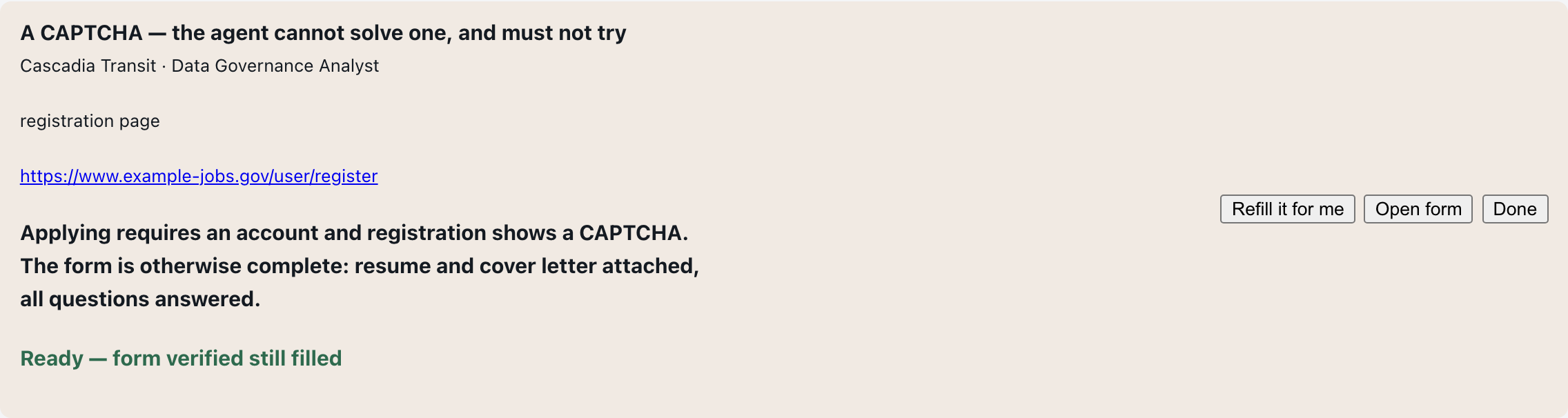
One blocker, in its own words. The agent filled everything else, verified the form is still filled, and stopped — because a CAPTCHA is not something it should be trying to defeat.
What a month of operating taught me
Three things I did not expect, and would not have believed without the data.
Reliability is cheaper than efficiency. I assumed making an agent cheap meant making it use fewer tokens. In fact a failed run costs almost exactly what a successful one costs — it loads the skill, reasons about the page, drives the browser, and produces nothing. Every real improvement in cost per application came from fixing runs that banked nothing, not from trimming prompts.
Advisory limits are not limits. The clock politely asked the agent to stop at twenty minutes. Runs took twenty-five and thirty-five. There is a watchdog now, and a schedule with room for the work to finish.
Measure outcomes, not exit codes. For weeks, a run that burned twenty
minutes and produced nothing was recorded as ok, because the process exited
cleanly. That single mislabel hid everything else. A run now records what it
actually banked, read from the difference in state — which needs no cooperation
from the agent, and that matters, because the runs most worth knowing about are
the ones that cannot file a report.
There were bugs, and some cost real money: a browser lock that reported success and released itself immediately, a CAPTCHA detector that parked applications on invisible scoring frames that needed nothing from anyone. They are fixed, they are covered by tests, and each one taught the same lesson — state spread across files that can disagree is where agents break, far more often than the model being wrong.
What surprised me
How little of the month went on the models.
Budgets, locks, logs, notifications, identity, a dashboard to see what the thing had actually done, and two test suites — that was the work. Getting a model to read a form and decide what to type was the easy part, and it was working within days. Everything that makes it safe to leave running overnight against real employers took the rest of the month.
If you are building in this shape, expect that ratio. The intelligence is cheap now. The scaffolding that makes intelligence trustworthy is not.
A note on blast radius
Meritclaw applies to real jobs on my behalf. A duplicate application is a real signal to a real employer about a real person’s career, and that asymmetry shaped nearly every decision here: the gate that refuses to attach a document whose layout drifted, the identity checks that stop one job being applied to twice, the refusal to invent a claim the resume cannot support, and the deliberate choice to interrupt a human for anything that cannot be undone.
If you build something in this shape, assume your worst bug will be found by an employer rather than by you.
Meritclaw runs on OpenClaw with DeepSeek. It was built at Cognilogue, where we build AI products people trust. A packaged version that works with your own resume and your own model key is in progress — get in touch if that would be useful to you.